Select User Input
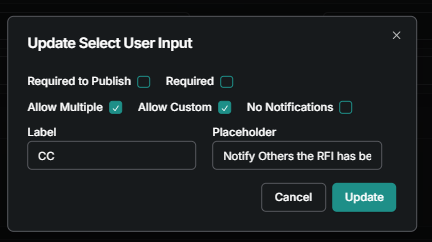
Input that pulls a list of users from the project directory.
Written By Patrick
Last updated Over 1 year ago
Check out the article on Standard Input Properties for Required, Allow Multiple, Label and Placeholder inputs.
Allow Custom - If checked, it adds the ability to type in a user that is not in the directory. Ex - Names need to go in Mercury who are not Mercury users like attendance on Meetings or Equipment inspections.
No Notifications - By default any user listed in a form will receive notifications, this flag will turn off all notifications to make the filed just a list of names.
Good to Know
Only those with permission to use the template will be shown on the list of users.
Was this helpful?
Still need help? Ask the team