Project Creation & Information
Instructions for IT and Mercury Admins to create new projects. If you just need a project created head to MAP>Estimating>Project Initiation>Setup Mercury.
Written By Patrick
Last updated 12 months ago
Company Level Admin permissions are required.
Create Project
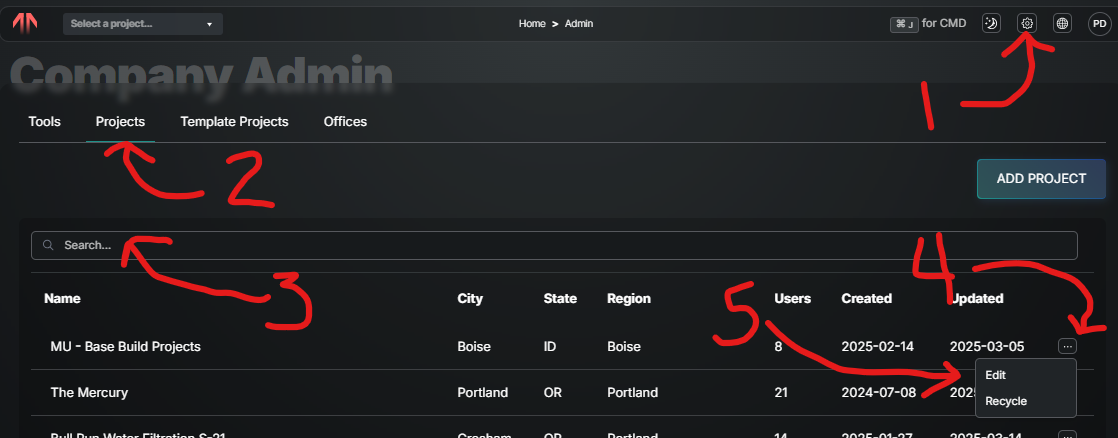
Select the Gear in the far upper right
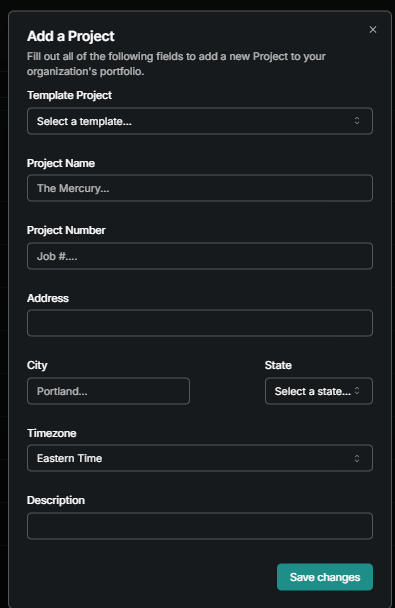
Under the Projects tab select ADD PROJECT
Enter the information from the from the MS Form listed below.
Choose Template - Different regions or departments can start with their own standard tools and template. Choose based on Region and SPD or Captital. This info comes along with the Template:
Office or Company - Andersen of …
Standard Regional Contacts - VP’s, Regional EHS, General Superintendent’s etc.
Tool Menu and Imported Templates.
Project Name - Use the most common one.
Project Number - Easier to find than the name.
Primary Contact - Enter this person into the Directory.
Street Address, City, & State - This sets the location for the weather forecast for Daily Reports. (Nearest cross street will work)
Time Zone - Sets the clocks for your Project.
Description - Copy from Form.
Edit Project Information
To make changes to any of the information entered at project creation:
Select the Gear in the upper right
Select the Projects tab
Look Up the Project
Select the Options (3 dots) on the far right.
Select Edit
Was this helpful?
Still need help? Ask the team