Desktop Tips
Stuff that can save you time when on your laptop, but may not be obvious.
Written By Patrick
Last updated About 2 months ago
Saved Set
Filling out a form with nearly identical info many times a day or week? Follow the steps below to grab a form that has already been filled out to populate the next form created. That way only the changes have to by entered instead of the entire form.
These saved forms will only be saved for you.
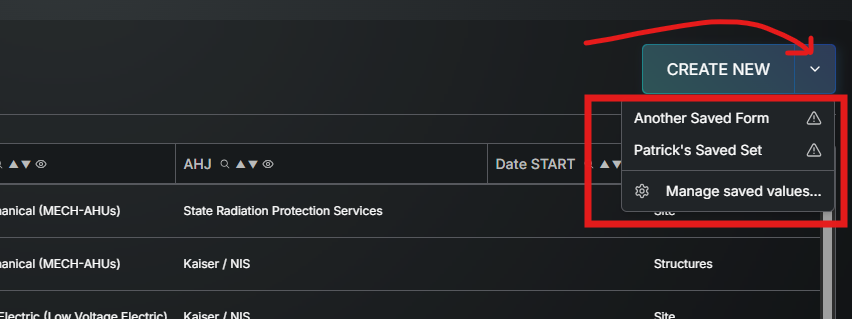
Use the Managed Saved Set option to change the label or delete
The hazard symbol means the form that was saved is from an older version of that template and therefore may need to be updated (but will still work).
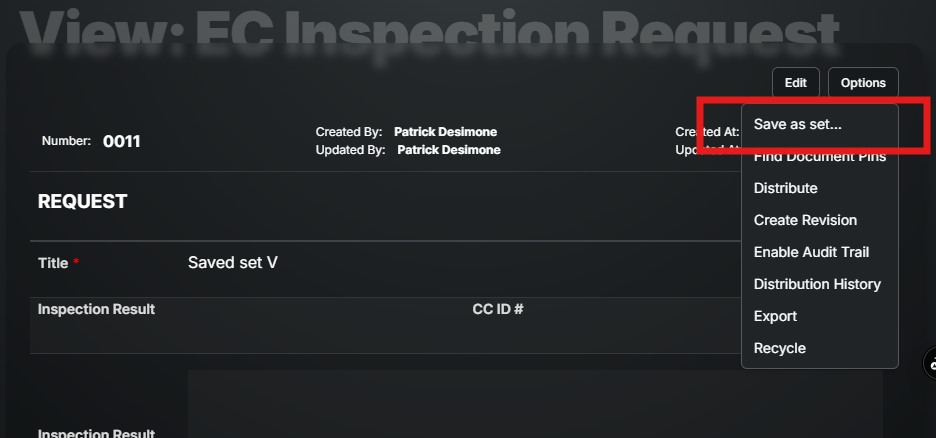
Open any Draft of Published form and under Options select Save as Set… and give it a name.
* The next time you go to Create New for that template that Saved Form name will be under the drop down arrow. Then all of the text and selections in that form will be entered from the start and only the fields in need of updating need to be touched.
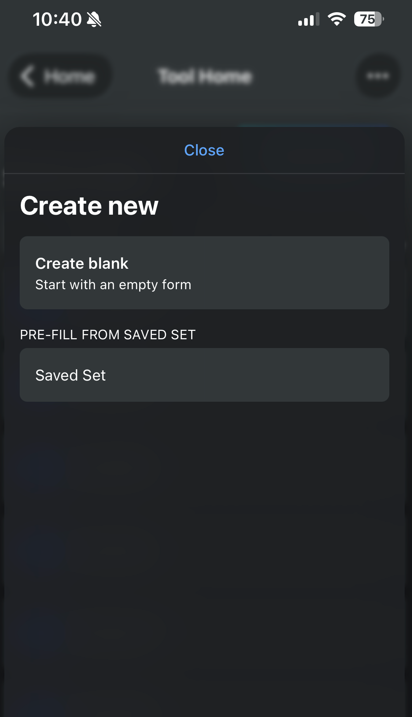
*On Mobile any form with a Saved Set will give the option below before Creating New.
Was this helpful?
Still need help? Ask the team