MERCURY UPDATE | August 06, 2025

Sorry, it’s been a while since our last update. We’ve been busy supporting and developing and haven’t made the time to write about it! There are some significant changes featured here, so please read on.
FEATURED CHANGES
Featured changes are those that came highly requested and/or have a significant impact on functionality.
Documents: Find & Replace
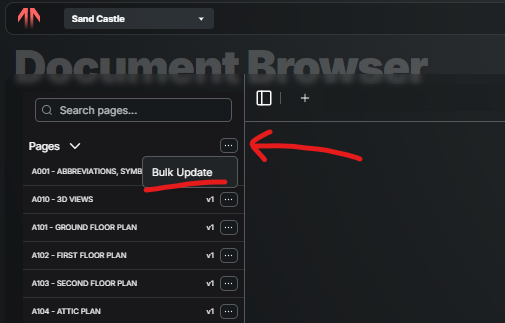
Have an ASI that includes many sheets? You can now Bulk Update by uploading the single PDF file to the Drawings and Mercury will find existing sheets with the same name and replace them with the new ones. Check out the Bulk Update article to lean more.
Assignees: ARC/ENG or OWNER modify workflow
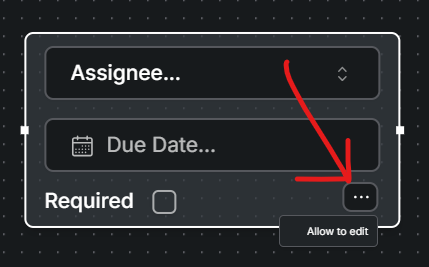
Often the entire workflow is not crystal clear when an RFI or Submittal is Published. The creator of the form can flag an assignee with “Allow Edit”, so that assignee can modify the workflow. This allows assignees who typically only would respond to a form assigned to them (not edit the entire form) to forward or include other parties without having to ask the form creator or admin. Check out the Allow Edit article for more info.
Assignees: Final Response [Live by 8/8/25]
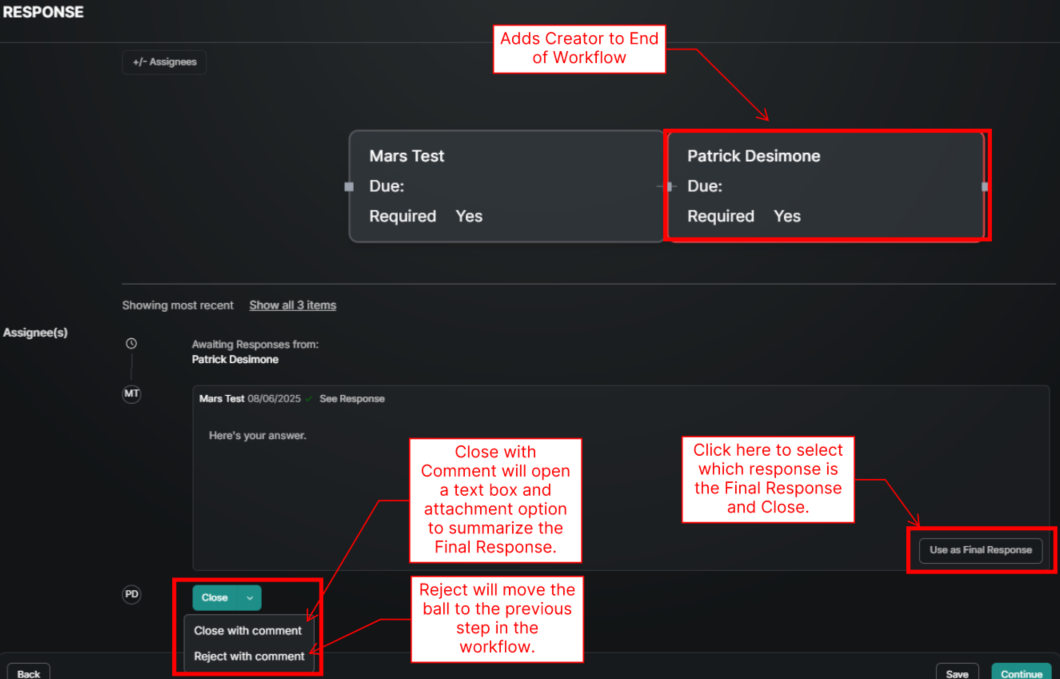
No need to add yourself at the end of every workflow! Making sure the final response is not lost in the historical back and fourth in the form is critical. The creator or manager of a form is also responsible for making sure the final response is clear and complete. To streamline this, we now have an automation that adds the creator to the end of the workflow so they can review the final response before closing the form. The creator can scroll thru the history and “Choose Final Response”, Close with Comment, or Close. Check out the Final Response article for more info.
Documents: Export Title or Text Fields as PDF Header
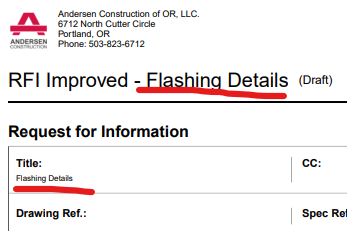
Instead of the system pulling in the Template name as the text at the top of the pdf, you can now choose to pick a Title or Text field to go there instead. TEMPLATE NAME - TITLE/TEXT - (NUMBER). Check out the Doc: Title & Text.
ENHANCEMENTS AND FIXES
Here are all the changes made, grouped by where they can be found. Please reach out to pdesimone@shoestringvalley.com if you have any questions as to why these changes were made.
Documents
Transfer Mark-Ups to Revisions: When replacing pages, any mark ups on the old page will be brought forward to the new one.
Drag and Drop: In addition to selecting “upload” and then choosing a file, you can now drag a file from another window.
Upload Multiple: Multiple files can be selected for upload.
Miscellaneous formatting improvements to PDF export.
Directory
Edit Contacts: More fields like phone, title and name are now editable by those with Admin permissions.
Add Users by Name: Existing or New users can be added to a project by looking up any part of their name in addition to their email address.
Mobile Directory Tap Phone or Email: Phone numbers and email address are linked from mobile and allow you to make a call or create an email.
Daily Report
Workforce Copy From SPECIFIC Date: Instead of just copying from yesterday you can now chose a specific date in the past. Dates that are in bold are those with workforce entries.
Desktop Mobile Sync: Tightened up the syncing of entries/updates between mobile and desktop. You still gotta hit save!
Report Date: The Table View and report header show “Date Represented” along with Created and Updated dates.
Admin
Copying Workflows: Workflows can be saved within each tool to avoid re-creating standard workflows each time the assignees section is filled out. Additionally, the template can be modified once inserted into the form. Check out the Copying Assignee Workflows article for more detail.
Observation NOT on the fly: Under settings there is now a flag for “Disallow Direct Creation” to prevent observations for things like quality and equipment to be created and not linked to a checklist.
Sync Template Display Mode: This has been corrected so that when a template is synced the Display mode remains.
General
ToDo from Closed On The Spot: Closing on the spot no longer creates a ToDo item for the person assigned.
Recent Updates Filtered: The recent updates list on the home screen only shows items that the user has permissions to view.
Tool Home Table Navigation: The page double forward chevrons are no longer jump too far forward to empty pages and instead go to the last page.
Select Groups from Contacts: Forms that include a User Select field now include Groups.
Uploaded Attachment Layout: When many files are uploaded to a form, they now stack up in clean rows.
MERCURY USER INNOVATIONS
These are the tools that our own users have thought of and created on their own.
Planned Checklist for Submittals: Using the Planned Checklist is a way to organize a very long list of submittals in a way that is easy to rollup and create submittals as the become ready to submit.
Delivery Observation: A way to easily record a picture, description, storage location and more from a mobile device.
EHS & QC Submittals: A way for the whole team to review the site specific safety plans or QA/QC plans from our trade partners. It also provides a place for them to upload (instead of losing emails) while also keeping track of who’s has completed their review even if someone goes on vacation.