MERCURY UPDATE | September 2026
This one is a shorter list than August, but includes more sought-after changes. A couple of the changes below close gaps that several of you flagged on site visits, one change a default you'll notice the moment you mark-up a drawing. If you uploaded a spec section or a drawing set in the last few weeks, the note under Documents is worth two minutes of your time.
Thank you, as always, to everyone who took the time to file a ticket. Three of the fixes below came from support threads opened within hours of each other, and that overlap is what let us find the shared root cause in a day instead of a month. “Built by builders” only works if the builders keep telling us how we can improve. And we hope you not only see the improvements listed below but feel them while using Mercury.
FEATURED CHANGES
Featured changes are those that came highly requested, have a significant impact on functionality, or we thought were more exciting than the others.
Documents: Mark-Ups Are View-Only Until Unlocked
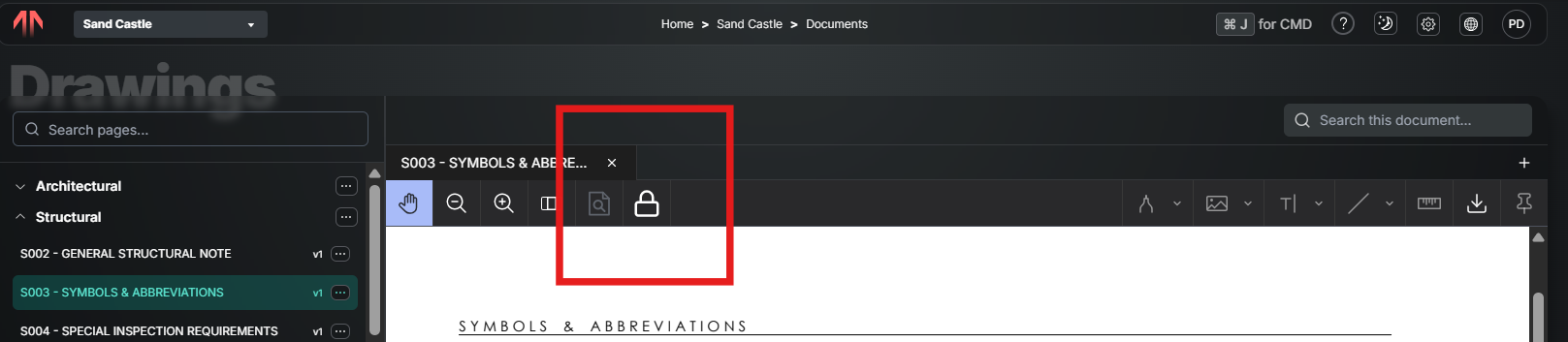
If you have edit rights on Documents, you could previously grab and move a mark-up by accident. Mark-ups now open in a view-only state for everyone. To create or change one, you unlock the mark-up tools with a padlock toggle; a closed padlock means look, open padlock means edit. Form pins and the Pin Form tool follow the same rules. Applies to both web and mobile.
Documents: Mark-Up Settings Stay
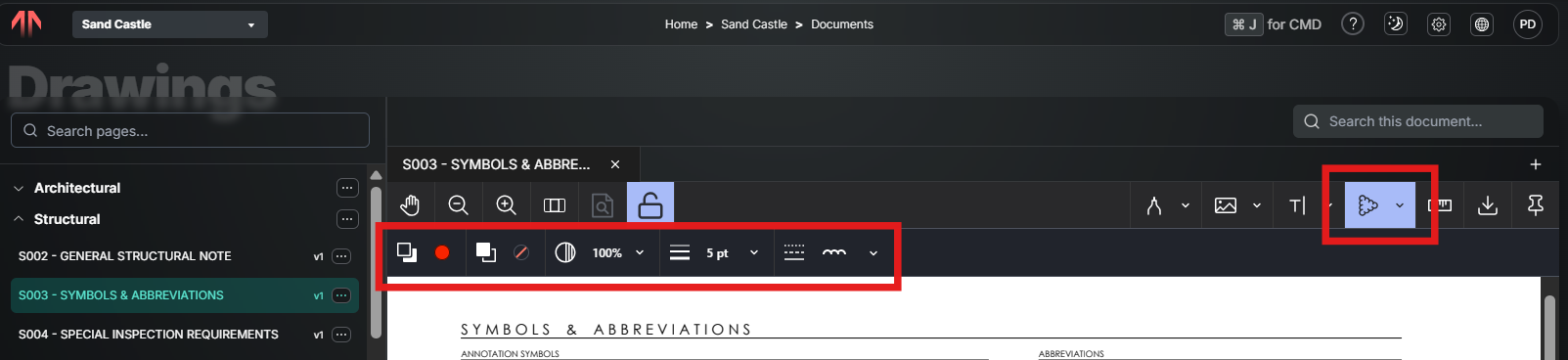
We now not only save what color, weight, and other settings, but also the last tool used. This is valuable for those who use the same tool often (like a red cloud with the perfect weight) over and over again.
Form Tables: Voided Forms Hidden by Default
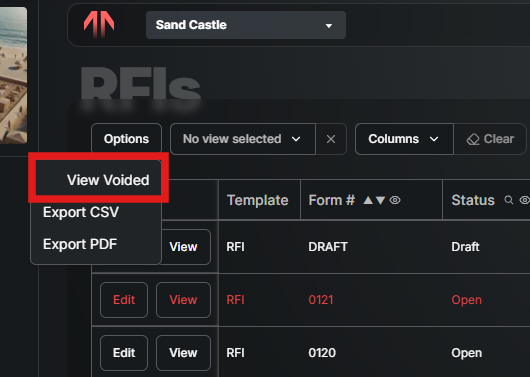
Form tables no longer show voided forms unless you ask for them. This tries to strike a middle ground of permatently deleting and holding on for record. If you need them, there's View Voided under the Options button on the table. Nothing is deleted or moved.
Meetings: Limit Previous Notes
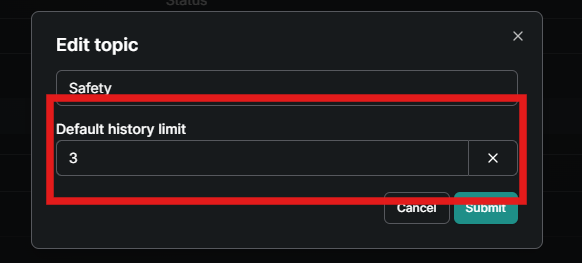
When a topic has collected months of notes, the export ran turned into and unruley PDF. Topic inputs carry a Default history limit and a Maximum history limit. The limit governs how many previous notes appear on screen and in the export. Separately, you can now display several selected previous-note dates at once instead of being held to one at a time. Here’s the Previous Notes Limit article for more info.
Template Builder: Permissions by Input
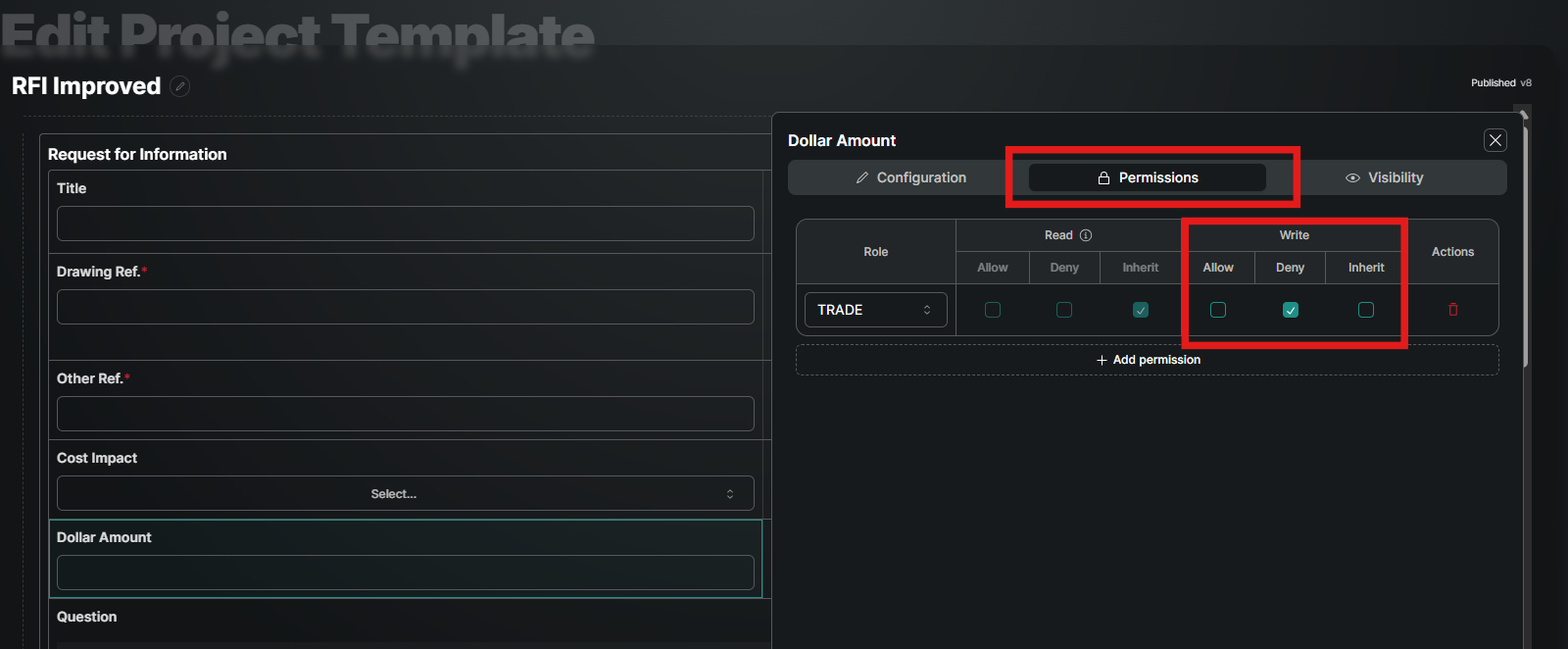
For those of you creating tools and templates, we now offer was to make specific fields (aka inputs) read-only or editable. So if you want most, but not all, of the form editable, this will come in handy.
While we were in there, we sharpened up the entire look and feel of the template builder and added a few more features. You can drag inputs around, there’s a nice drawer that slides out to make edits, and the inputs are much easier to read. Now get to making your own tools!
FEATURES & FIXES
Documents
Fixed spec sections being truncated to a single page on upload. The last section in any uploaded PDF was stored as one page instead of running to the end of the file. If you think a section is short, tell us and we'll help you check.
Fixed “Failed to run middleware” when uploading a new version of a sheet. This stemmed from running two versions of the upload tool side by side, so a lesson was learned.
The selective rollout of the new version of Document Upload and Update is going well. Just let us know if you want to join (use Contact Support).
Form Tables
Overdue items now stand out. Any row with an open overdue item — RFI, submittal, QC item — renders in red across the whole row, in both the form table and the planner, so the list tells you where to look without reading every due date.
Saved views now include the Rows per Page.
Checklists & quality
Observations tables now carry the originating Checklist and Template Name as columns, not just the checklist item, and you can filter by them. You can pull every observation that came from one checklist.
Failing a checklist item now correctly forces the required observation, including for items that were deleted from the library but are still planned through Default Values. Admins also get a warning before deleting a library item that Default Values still references.
Fixed the N/A count pill not updating when items were marked N/A. This was only a display error, the actual counts were correct.
Fixed the QC Planner showing an empty “Created Forms:” heading when a form slot had no active forms.
Meetings
Fixed the Add Topic dialog doing nothing on submit. The dialog accepted a name and a history limit, then silently refused to save.
Did we mention you can limit the previous notes? That was a big one, so worth mentioning again here.
Photo’s
Adding a photo directly to an album fixed. There were situations where only the first picture was getting captured when opening an album, selecting add photo, and then taking many pictures with the camera.
Forms & permissions
You can now distribute a form you created without admin rights. Distribute used to require Admin on the tool. It's now gated on publish authority instead: if you can publish a form, you can distribute the ones you created. Distributing someone else's form still requires Admin, as does the Audit Trail and Recycle.
When a file is attached to a form, the size displayed is now easier to read and more accurate.
You no longer need to be an Admin on a tool to use the Distribute tool. Create now includes the option to distribute.
Notifications
Fixed the Subscribed Notifications page. If you were added to Mercury through a project directory (mostly trade partners, architects, and other outside companies), the page told you to open a project first, and picking a project dropped you on the project home instead of your notifications.
MERCURY USER INNOVATIONS
THIS IS WHY WE CREATED MERCURY! These are the tools that our own users have thought of and created on their own. Seriously, no software engineers were involved in creating the following:
The Horizon House project is in the very early stages of creating a Concrete Pre-Pour Checklist to get decks signed off. The concept is to assign the form to all the trades that have work on the slab, they get an item of their ToDo list labeled to match that days pour, and then once everyone responds the form gets closed. Hit that question mark in the app to let us know if you want to try it out on your project!