MERCURY UPDATE | May 2026

In this release, we tightened up exports, notifications, forms, safety flows, and admin controls, basically a spring cleaning where the broom also shipped features. We are still leaning heavily into providing flexibility to meet the many different needs of our people and projects. Make sure you’re keeping up or you’ll miss something that helps your daily experience with Mercury!
FEATURED CHANGES
Featured changes are those that came highly requested, have a significant impact on functionality, or we thought they were more exciting than the others.
NOTIFICATIONS!
Love them or hate them we all have an opinion on what they say and how often they come. And since we’ll never agree on what those factors are, we made a number of changes to customize your project and tools to your tastes.
Both the email subject and body are customizable by template.
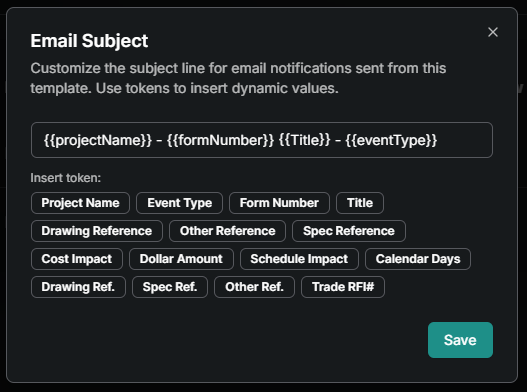
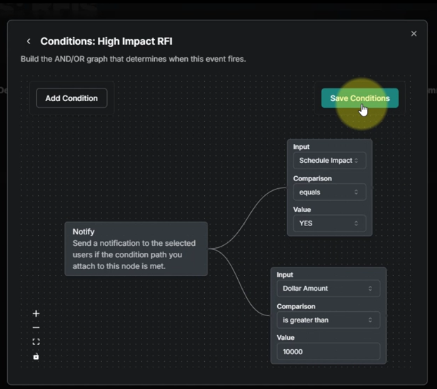
You can also change what triggers a notification and who gets them with event based notifications and subscriptions.
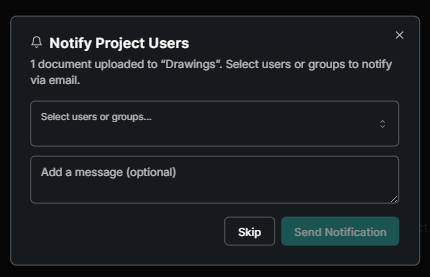
After uploading a new document you’ll be prompted with an option to “Notify Project Users”. This will send an email notification showing a new drawing or spec was added to the current set. Check out the article for more info.
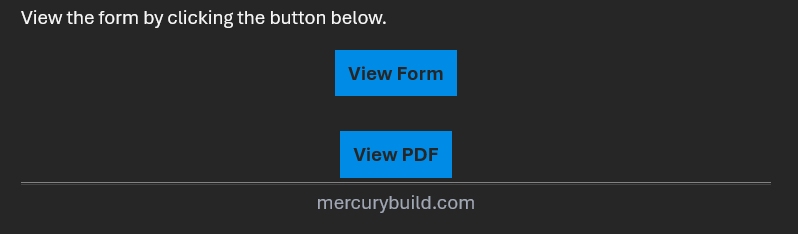
The View PDF is now a large button instead of hyperlinked text. And we added the footer to make our notification emails look nothing like phishing.
ENHANCEMENTS AND FIXES
Here are more changes made, grouped by where they can be found. Please reach out to pdesimone@shoestringvalley.com if you have any questions as to why and he will name names as to who requested them.
Documents
Added version re-sequencing in case the order of uploading new drawings or specs does not match the version order.
Fixed measurement scale support to the markup tool for better precision.
Improved export controls so specific document pages can be selected for download/export.
Drawings and Specification default to collapsed (pages hidden).
Fixed cases where documents refused to export, which was a bit dramatic.
Added document page filtering by version.
Forms
Added saved values for templates to speed up repeated form work.
Fixed form save conflicts to reduce collisions between edits.
Fixed admin users being unable to close forms they didn’t create.
Fixed loopholes in required fields still being allowed to publish.
Improved form table navigation so moving through responses is less of a scavenger hunt.
Mobile
Fixed the company selector on pass observations where it was hidden or not functioning.
Fixed mobile photo attachments failing during safety walk observations.
Added mobile help and feedback access.
Fixed mobile album selection issues.
Improved drawing navigation on mobile.
Added mobile response filtering.
Added location display for planned checklists on mobile.
Directory
Added support for editing role names.
Fixed recycled users being removed from groups when recycled from the project directory.
Admin
Fixed hidden projects appearing on the company home screen when they were supposed to stay hidden.
Added an input for baked text for including instructions or text on a form that cannot be changed. An example use case would be including a statement about pricing RFI’s at the bottom of the RFI form.
Home Screen
Improved how dates display.
Improved home screen table navigation behavior.
Moved overdue ToDo items to the top of the list and highlighted them so they can no longer pretend to be invisible.
Photos
Fixed album selection issues on mobile.
Added options for moving photos within albums.
Safety
Fixed mobile observation flows involving company selection.
Fixed mobile photo attachments in safety walks.
Improved mobile form response filtering for safety-related work.
Corrected safety metrics for overdue corrections and observation status.
Fixed safety metrics for Open Observations not including SAFE observations
Added mobile filtering for checklist/form responses.
Quality
Fixed quality metrics so pass checklist items are no longer incorrectly included in depth and quality calculations.
Fixed a bug that could create too many forms from planned checklists. Ambition is good; cloning forms endlessly is not.
Added mobile filtering for checklist/form responses.
Meeting Minutes
Fixed misaligned bullet points in rich text. Bullets now understand where they live.
General improvements
Added in-app help and feedback on web.
Improved drawing distribution notification messaging.
Added document notifications with page add support.
Improved document search with highlighted matching text.
Fixed incident notifications that didn’t match their template.
Added checklist search and filtering tools for quality workflows.
Fixed form save conflicts affecting submittal-related workflows.
Fixed issues with closing forms when the admin wasn’t the original creator.
MERCURY USER INNOVATIONS
THIS IS WHY WE CREATED MERCURY! These are the tools that our own users have thought of and created on their own. Seriously, no software engineers were involved in creating the following:
The “Request Inspection” tool is coming together out at Kaiser Sunnyside. It will allow trade partners to request an inspection to Andersen in Mercury. Andersen can then import those requests in and then back out of the County’s web portal. Sounds easy, but when they get to hundreds of requests a day everyone will be glad it’s not being done on a whiteboard or excel sheet!